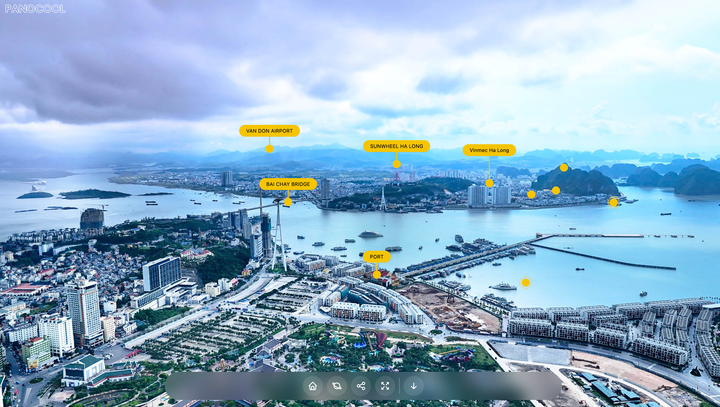

Aerial Pins for 360° Drone Photos: Callout Hotspots in PanoCool Pin schools, parks and train stations on a 360° drone photo, outline the lot and export marketing images, all in PanoCool.
How to set up multi-language virtual tours in PanoCool PanoCool can show one virtual tour in up to five languages, and visitors switch between them with a language selector on the tour. The menu, scene titles, hotspot labels, popups and the viewer's own buttons all change with it, so a guest from Tokyo and a guest from
Running a 360 tour agency on PanoCool You shoot the panoramas, build the tours and keep them online for your clients: real estate agents, hotels, venues, schools. PanoCool can run that whole business under your brand. This guide shows how agencies set it up: one Super Cool account, every client tour on your own domain, client access
Set up a white-label domain for all your virtual tours White Label puts every tour you own on one domain of your own. Instead of pano.cool/@username/villa-rosa, visitors open tours.yourbrand.com/villa-rosa. You connect the domain once, in your account settings. From then on, each tour you own opens there by its project slug, with
How to Create a 3D House Tour from Insta360 X6 Photos with AI Auto Connect Creating a 3D house tour used to mean spending a lot of time manually placing scenes, connecting every 360 photo, and building navigation one hotspot at a time. With an Insta360 X6 and PanoCool AI Auto Connect, you can make the process much faster. In this guide, we’ll turn
How to Create a Day & Night Effect for 360 Photos A single 360 photo can already give visitors a good sense of a place, but sometimes you want to show how the same location changes throughout the day. For example, a restaurant may feel completely different at night when the lights come on. A resort may look brighter and more
Create a 360 Virtual Tour in Minutes with AI Auto Connect Creating a connected 360° walkthrough normally takes time. After taking your photos, you may need to place every scene on a floor plan, work out where each photo belongs, and manually create the connections between them. With PanoCool AI Auto Connect, much of that work can now be done automatically.